
Crossplane on AWS EKS


Introduction
Crossplane is an open-source Kubernetes add-on that extends Kubernetes to enable you to manage your infrastructure, services, and applications directly from Kubernetes clusters. It turns Kubernetes into a universal control plane by allowing you to provision, manage, and compose cloud resources and services alongside your applications, using Kubernetes-style declarative configuration. Crossplane adheres to the Kubernetes philosophy of declarative management and automation, aiming to leverage the power of Kubernetes to manage external resources with the same ease as managing pods or deployments within a cluster.

Why We Need Crossplane?
Unified API for Infrastructure Management: Crossplane provides a consistent API to manage different cloud services and resources, enabling developers to provision and manage infrastructure using kubectl or any Kubernetes tools. This reduces context switching and the need to learn multiple cloud provider APIs.
Infrastructure as Code (IaC): With Crossplane, you can define your infrastructure using Kubernetes manifests. This approach to IaC enables version control, peer review, and repeatable deployments across environments.
Workload Portability: Crossplane enables workload portability across different clouds and environments by abstracting the underlying infrastructure details. This makes it easier to migrate applications or run them in multi-cloud and hybrid-cloud environments.
Declarative Configuration: Leveraging Kubernetes’ declarative configuration model, Crossplane allows you to specify the desired state of your infrastructure and services, with Kubernetes ensuring that the actual state matches the desired state.
Self-Service Infrastructure: Crossplane can be configured to offer self-service infrastructure provisioning within the bounds of policies and best practices defined by administrators. This empowers developers to provision the resources they need without waiting for operations teams, while still adhering to organizational guidelines.
Crossplane Setup on AWS EKS:-
Prerequisite
Install Git: Git Installation Guide
Install Terraform: Terraform Installation Guide
Install eksctl: eksctl Installation Guide
Install kubectl: kubectl Installation Guide
Install Helm: Helm Installation Guide
Install Crossplane CLI: Crossplane CLI Installation Guide
git clone https://github.com/vkhadela1985/aws-eks-crossplane.git
cd aws-eks-crossplane
terraform init
terraform plan
terraform apply
Steps :-
eksctl create iamidentitymapping --cluster test-eks-cluster --arn <iam-user-arn> --username <username> --group system:masters
3. Update the kubeconfig
Update the kubeconfig.
aws eks update-kubeconfig --region <region> --name <cluster-name>
4. Verify Cluster Access
Verify access to the Kubernetes cluster.
kubectl get svc
5. Install Crossplane Using Helm
Add the Crossplane Helm repository and install Crossplane.
helm repo add crossplane-stable https://charts.crossplane.io/stable
helm repo update
helm install crossplane crossplane-stable/crossplane --namespace crossplane-system --create-namespace
6. Verify Crossplane Installation
Check the Crossplane pods and API resources
kubectl get pods -n crossplane-system
kubectl api-resources | grep crossplane
7. Install AWS Provider for Crossplane
Apply the AWS provider configuration
cat <<EOF | kubectl apply -f -
apiVersion: pkg.crossplane.io/v1
kind: Provider
metadata:
name: provider-aws-s3
spec:
package: xpkg.upbound.io/upbound/provider-aws-s3:v1.1.0
EOF
8. Verify Provider Installation
List the installed providers.
kubectl get providers
9. Create a Kubernetes secret for AWS
Note: The provider requires credentials to create and manage AWS resources.
Create a text file containing the AWS account aws_access_key_id and aws_secret_access_key. Save this text file as aws-credentials.txt.
aws_access_key_id = YOUR_ACCESS_KEY_ID
aws_secret_access_key = YOUR_SECRET_ACCESS_KEY
Create the secret in the crossplane-system namespace.
kubectl create secret generic aws-secret -n crossplane-system --from-file=creds=./aws-credentials.txt
10. Create a ProviderConfig
Apply the ProviderConfig to use the secret for AWS operations.
cat <<EOF | kubectl apply -f -
apiVersion: aws.upbound.io/v1beta1
kind: ProviderConfig
metadata:
name: default
spec:
credentials:
source: Secret
secretRef:
namespace: crossplane-system
name: aws-secret
key: creds
EOF
11. Create a managed resource in AWS
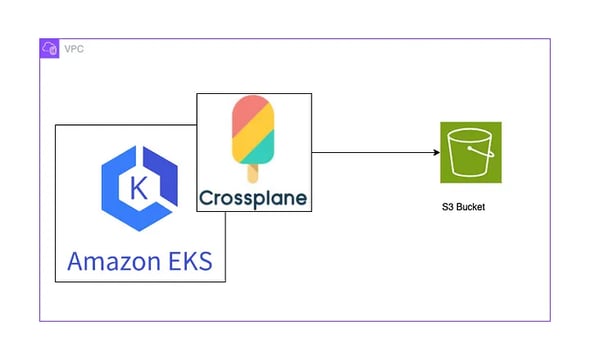
Example: Create an S3 bucket.
cat <<EOF | kubectl create -f -
apiVersion: s3.aws.upbound.io/v1beta1
kind: Bucket
metadata:
generateName: crossplane-bucket-
spec:
forProvider:
region: ap-south-1
providerConfigRef:
name: default
EOF
12. Get buckets created using Crossplane
List the buckets managed by Crossplane.
kubectl get bucket
13. Delete managed resource from AWS
Delete an S3 bucket managed by Crossplane.
kubectl delete bucket <bucket-name>
2. Enabling IAM principal access to your cluster
Create an IAM identity mapping for cluster access
1. Provision the EKS Cluster
Clone the repository and apply the Terraform configuration to provision the EKS cluster.
Yajurveda Infotech is a leading provider of cloud services and DevOps solutions with over 10+ years of experience in delivering seamless, scalable, and secure Cloud infrastructures.
Contact us at
contact.yajurveda@gmail.com
+919904019843
© 2025. All rights reserved.
About Us






Godrej-24, Tower F1, Mulshi, Hinjewadi, Pune Haveli, Maharashtra, India - 411057